
The 3 tracking gaps quietly raising your Meta CPL
When a finance account has a high cost per lead, the ads usually get the blame. In my experience, the tracking is the real culprit. Here are the three gaps I find over and over.
When a client comes to me with a cost per lead that keeps climbing, they almost always want to talk about the ads. The creative, the audiences, the budget. And almost every time, that’s not where the problem is.
The problem is that Meta is making decisions on bad information. If the algorithm can only see part of your results, it optimizes toward the wrong people, and no amount of creative testing fixes that.
Here are the three places I find the leak.
Meta only sees part of your conversions
Since iOS 14.5, the pixel that lives in the browser loses a real chunk of your conversions to tracking prevention, ad blockers, and Safari. In the accounts I look at, that’s usually somewhere between 20 and 40% that never makes it back to Meta.
Think about what that does. You tell Meta to find people who convert, but it only sees 60 to 80% of the ones who actually did. So it learns from a biased sample and spends your budget chasing the wrong pattern. The fix is the Conversions API, which sends events from your server instead of the browser, deduplicated against the pixel so nothing double counts.
You’re sending events, but they’re weak
Turning on the Conversions API isn’t the finish line. Meta scores how well it can match each event to a real person. That score is called Event Match Quality, and most accounts I open have never looked at it.
If you’re not sending hashed customer info with your events, that score is low, and low match quality means weaker optimization and softer reporting. It’s sitting right there in Events Manager, and checking it is ten minutes of work.
It is one of the fastest wins in the whole account.
Read the score on the right event
Event Match Quality is scored per event, and the scores are supposed to be different. On this same account, the Lead event scores 9.3 out of 10 while PageView sits at 6.1, and both numbers are correct. A PageView comes from an anonymous visitor. There’s no email, no phone, nothing to hash, so the score has a ceiling, and the ceiling doesn’t matter. A Lead comes from a completed form, so everything needed to match is right there.
If your Lead or Purchase event is scoring like a PageView, that is the leak. Worry about the events that carry money, not the ones that were never going to score well in the first place.
Not every low number is a leak
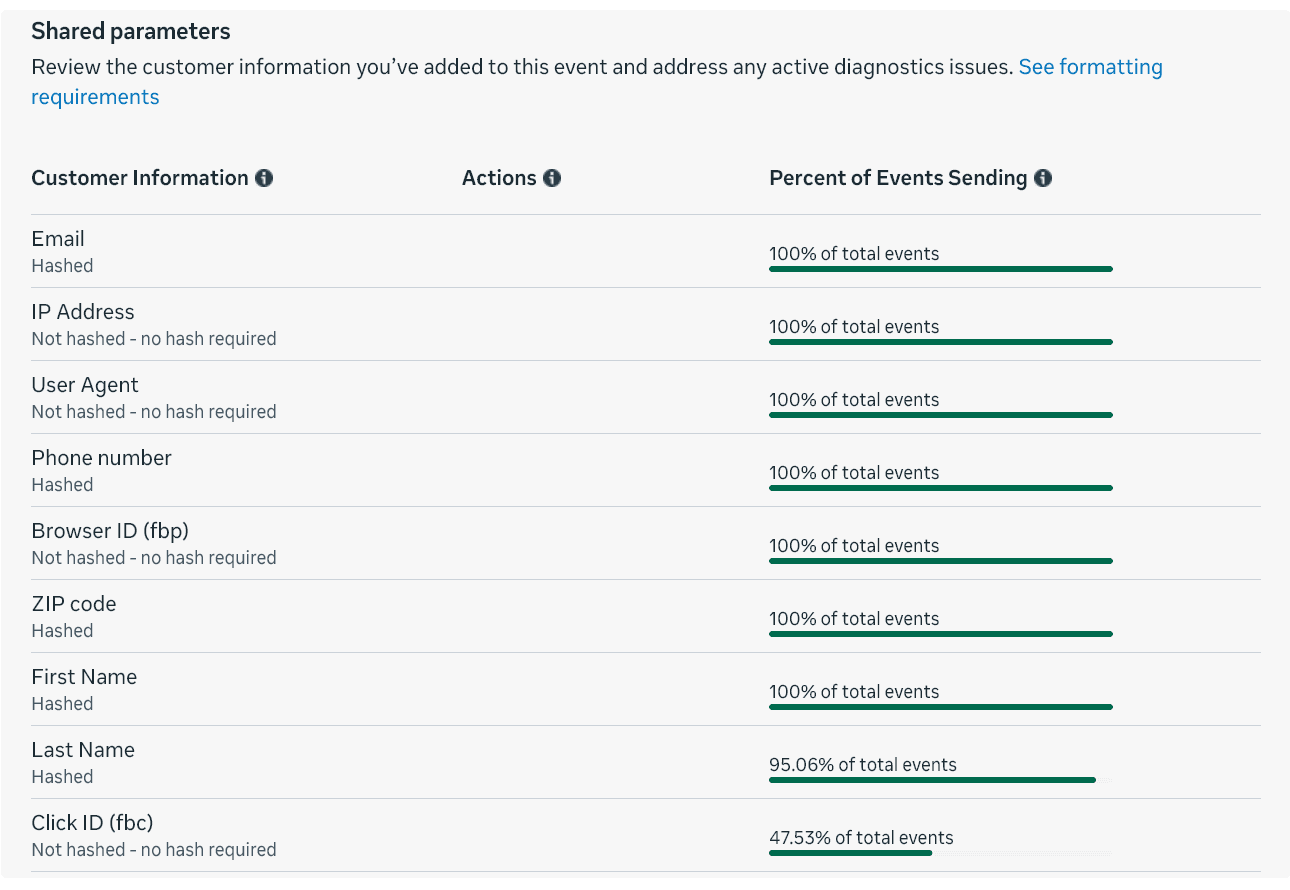
One more from the same account, because reading these screens is half the skill. The browser ID reaches Meta on 100% of Lead events. The click ID reaches it on 47.53%. They ride the same cookie plumbing, so if the setup were broken, both would be broken. The real explanation is upstream: the click ID only exists for people who arrived by clicking a Meta ad, and part of this account’s traffic comes from Google PPC. Those leads never had a Meta click ID to lose.
The lesson isn’t that 47.53% is fine everywhere. It’s that you have to know your traffic mix before a number can tell you anything. If the browser ID were the one sitting at 47%, that would be a real fire.
Everything still fires from the browser
Here’s the one that gets missed. Plenty of accounts have the Conversions API "on," but everything important still fires client-side, from the browser. That leaves the same holes the pixel had. True server-side tracking sends the events that matter from your server, where iOS and ad blockers can’t touch them.
This is the part most agencies outsource or skip, because it takes an actual developer. It’s also the part that matters most when every lead costs real money.
How to know if this is you
Don’t take my word for it. Pull Meta’s reported conversions and compare them against your CRM or backend for the same window. If the two numbers don’t line up, you have a tracking problem, not an ads problem.
Tuning the ads first will not help.
Five minutes in Events Manager gets you most of the answer:
- Check Event Match Quality on the event you optimize for, not on PageView.
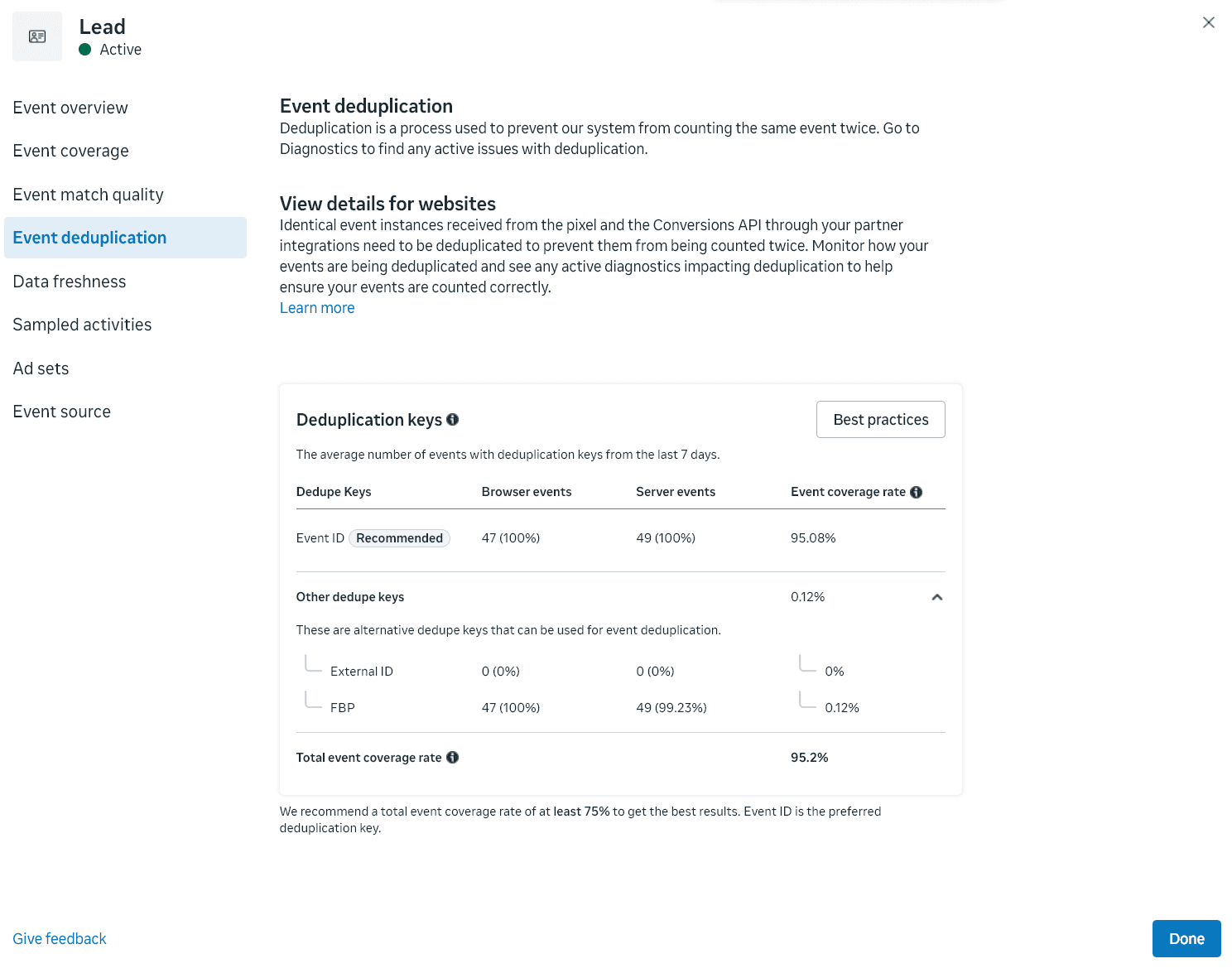
- Open that event’s deduplication view. Total coverage under Meta’s own 75% recommendation means events are being dropped or double counted.
- Look at how the event arrives. If everything says browser and nothing says server, the Conversions API is decoration.
- Compare Meta’s reported conversions against your CRM or backend for the same 30 days.
- If you buy traffic on more than one platform, expect the click ID share to mirror your Meta share, not 100%.
If you want a faster read, the free Meta Ads health check scores your tracking along with the rest of your setup in about two minutes.
Common questions
How much data does the Meta pixel actually lose?+
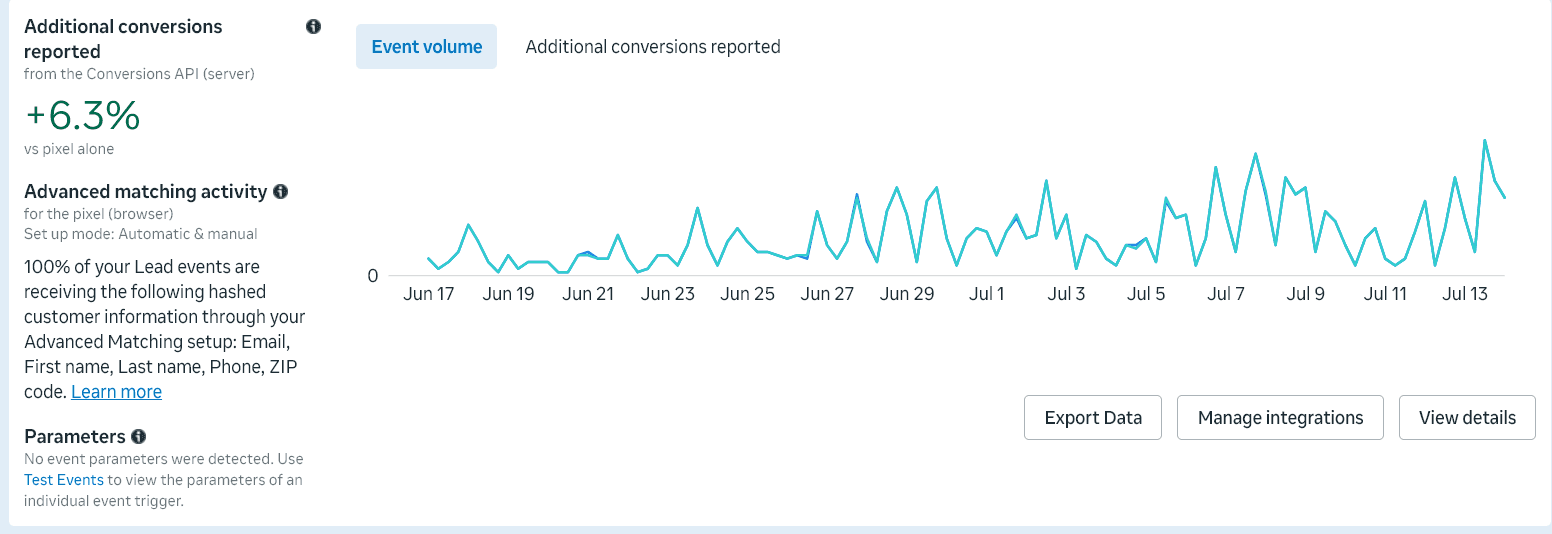
In the accounts I audit, it’s usually 20 to 40% of conversions, mostly to iOS, Safari, and ad blockers. But that’s the number for a setup nobody has looked after, which is the state most accounts are in when they reach me. It is not a law of physics. On an account where the match quality was right from the first day, there’s far less to go and find: on one of my own, the Conversions API only reports about 6% more conversions than the pixel already caught. A small number there isn’t a weak result. It means the leak was never allowed to open. Your number depends on your traffic and your setup, and if you’ve never checked, assume it’s worse than you think.
Will the Conversions API fix my cost per lead?+
It gives Meta more complete data to optimize on, which usually brings cost per result down over time. It’s a big lever, not a magic switch. Results vary by account.

Written by Keith Guirao, founder of Maven Media. Media buying since 2012, specialized in Meta since 2017. More about Keith →