
Why your Meta numbers never match your CRM
Meta says 60 leads. Your CRM says 44. Everyone panics. Here’s what’s actually happening, and why the gap isn’t a bug you can make disappear.
Almost every new client shows me the same thing in the first week. Meta says they got 60 leads. Their CRM says 44. Someone on the team is convinced Meta is lying, or the pixel is broken, or the agency is padding numbers.
Usually none of that is true. The gap is real, and it’s explainable. Chasing it to zero is a waste of time.
Let me walk through why the two numbers will never match, and which one to actually trust.
They’re counting different things
Meta counts conversions it can attribute to an ad, inside its own attribution window, using a mix of tracked events and modeling. Your CRM counts what actually landed in your system. Those are two different questions, so of course they give two different answers.
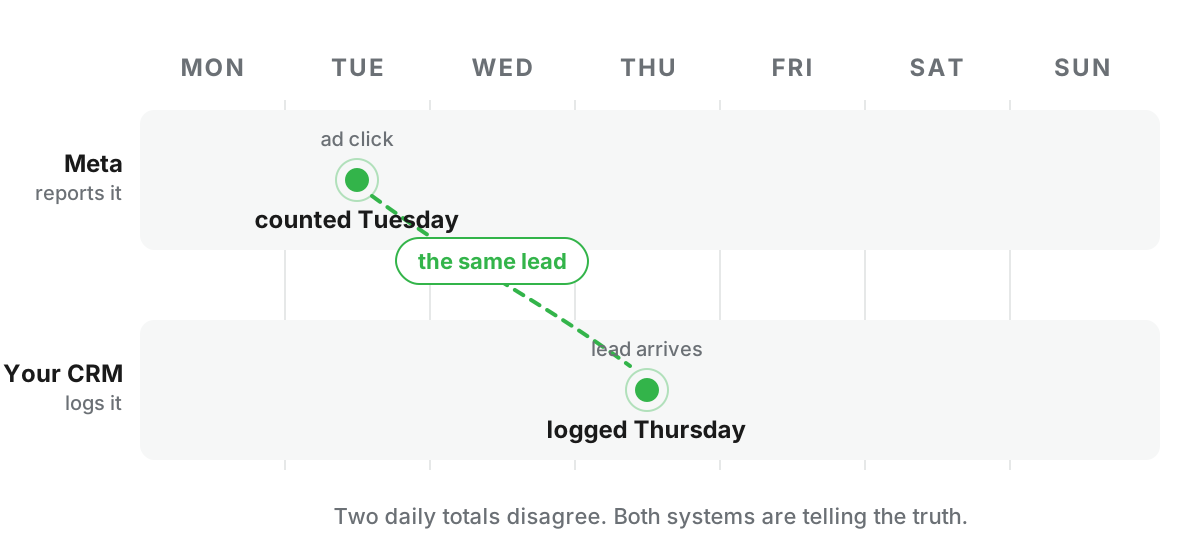
On top of that, Meta credits a conversion to the day of the ad click, not the day the lead came in. If someone clicks Tuesday and converts Thursday, Meta may log it Tuesday. Your CRM logs Thursday. Same lead, two different dates, two different daily totals.
The windows do the quiet damage
Meta’s default attribution setting is 7-day click, 1-day view. Translated: anyone who clicked in the last seven days, or saw the ad in the last day, gets counted when they convert. Your CRM has no concept of any of this. It logs a lead when the lead shows up, full stop.
Stretch the Tuesday example across a weekend and the daily reports stop matching entirely, even though every lead is real and both systems are telling the truth. A HELOC lead who clicks Friday night and applies Monday morning is a Monday lead to your CRM and a Friday conversion to Meta. Monthly totals behave far better than daily ones for exactly this reason. If you’re reconciling day by day, you’re mostly measuring the calendar.
You can shorten the attribution window per campaign, and it shrinks the gap on paper. It also hands the algorithm less to learn from. Pick that trade knowingly or don’t pick it.
Modeling fills the gaps
Remember the conversions the pixel loses? Meta doesn’t just drop those. It estimates them. That modeled portion is a genuine best guess, and it’s useful for optimization, but it is not a row in your database. That alone can explain a chunk of the difference.
So which number is right
Both, for their own job.
Your CRM is the truth for judging performance. Cost per real, qualified, closed lead is the number that pays your bills, and it comes from your backend, not from Meta’s dashboard. Meta’s number is the signal you feed the algorithm so it optimizes well. The goal isn’t to make them equal. The goal is to make Meta’s signal as complete and accurate as possible, then judge results against your backend.
That’s exactly what good server-side tracking does. It shrinks the gap by getting more real events back to Meta, and it lets you tie Meta’s spend to what your CRM actually shows.
How big a gap is normal
In my accounts, when the traffic is genuinely Meta-only, I expect the two reports to land within roughly 90% of each other. Ten points of daylight is the ordinary cost of two systems counting different things, and I don’t chase it. That varies by account and by funnel, so treat it as a rule of thumb, not a law.
Mixed traffic changes the math completely. If Google and Meta both feed the same form, your CRM total was never a Meta report card in the first place, and comparing them straight across will convince you something is broken when nothing is. Segment by source before you compare, or don’t compare.
When the gap IS a bug
One version of this deserves the panic: Meta reporting more conversions than your business actually produced. That’s usually deduplication failing. The pixel and the Conversions API both send the same event, nothing matches them up, and every lead counts twice. It looks like a suspiciously good dashboard, and it poisons every optimization decision downstream. The check takes a minute in Events Manager, and I walk through it in the tracking gaps guide.
The Monday morning version
Pull both reports for the same 30 days, once a month, and watch the trend rather than the day. A gap that sits stable around 10% on Meta-only traffic is a healthy account speaking two languages. A gap that’s large, or that swings hard week to week, is a tracking problem wearing a reporting costume, and it gets fixed at the tracking layer. Never by arguing with the dashboard.
If your two numbers are miles apart and nobody can explain why, that’s worth a look. The free Meta Ads health check is a good place to start.
Common questions
Which number should I trust, Meta or my CRM?+
Your CRM or backend is the source of truth for what actually happened. Meta’s number is a modeled estimate for optimization. Use your backend to judge performance, and use Meta’s signal to feed the algorithm.

Written by Keith Guirao, founder of Maven Media. Media buying since 2012, specialized in Meta since 2017. More about Keith →